Up & Running in Minutes
IPTV Setup Guide 2026 — Get Started in Minutes
Everything you need to start watching in 3 simple steps — no technical skills required.
3 Easy Steps to Get Started with Mojo 4K
Place Your Order
Pick the perfect plan for you — 1, 6 or 12 months — and get started right away.
Receive Your Login
Check your inbox or WhatsApp for login details and use them in your IPTV player app.
Start Watching
Connect Mojo 4K to your TV, computer or phone and enjoy unlimited channels instantly.
Choose Your Player
Already have an IPTV app?
Just send us the name of the app you use (for example: TiviMate, IBO Player, IPTV Smarters, SmartOne, DuplexPlay…).
We'll send you the correct login details for that app — no extra setup needed.
Don't have an app yet?
You can install one of these popular IPTV players:
- IBO Player
- TiviMate
- SmartOne
- DuplexPlay
- Net IPTV
- OTT Navigator (and many more)
It's easy to use, free, and works on almost every device. Follow the steps below to install it on your device.
Step-by-Step Setup by Device
Step 1: Download IPTV Smarters app from the App Store:
Smarters Player Lite on App Store
Or search the App Store for: Smarters Player Lite
Step 2: Open the app once downloaded and select Login With Xtream Codes API.
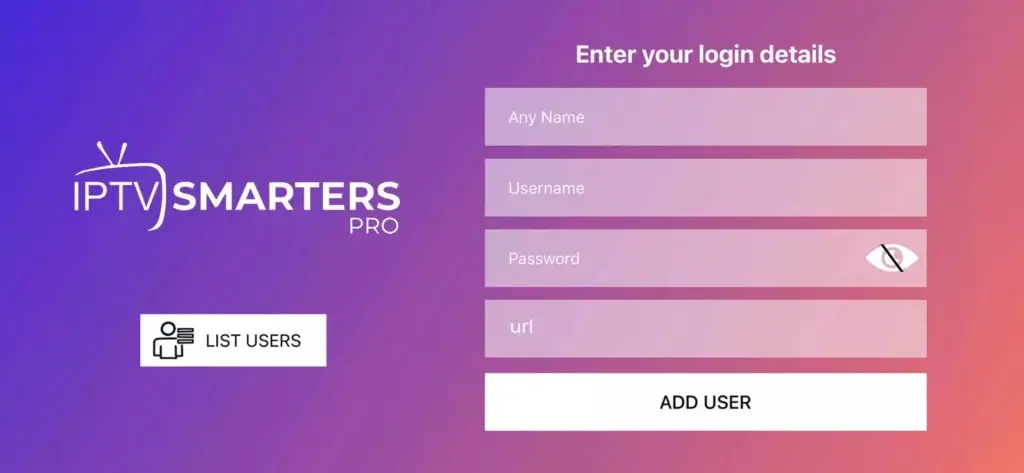
Step 3: Enter the login details we provided after your subscription. Then click "ADD USER" to proceed.
Step 4: Wait a few seconds for the channels to load.
Step 5: Click the "Live TV" icon to start watching.
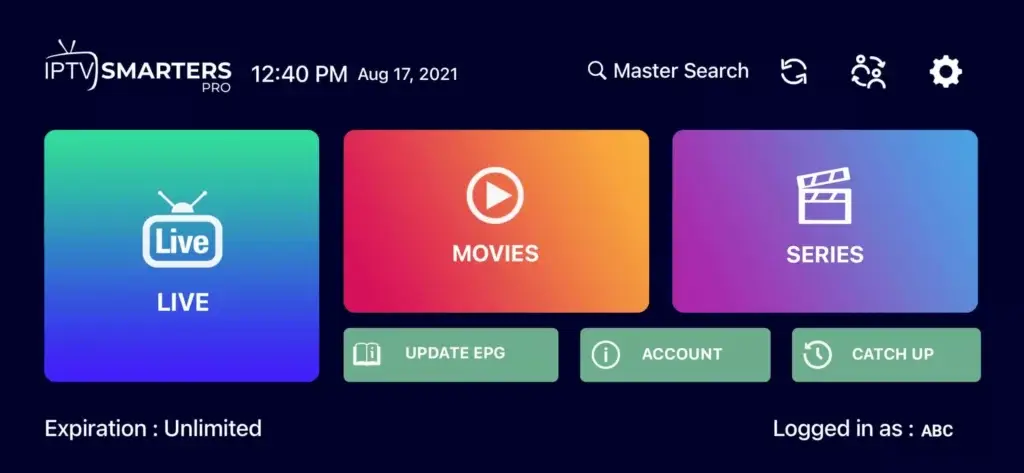
Step 6: Select the channel group you want to watch.
Step 7: Click on the channel name, then double-tap the small screen to go full screen.
Step 8: No need to add any EPG URL — just click "Install EPG".
Step 1: Download IPTV Smarters:
https://www.iptvsmarters.com/smarters.apk
Step 2: Open the app and select Login With Xtream Codes API.
Step 3: Enter the login details we provided and click "ADD USER".
Step 4: Wait a few seconds.
Step 5: Click the "Live TV" icon.
Step 6: Select the channel group you want to watch.
Step 7: Click a channel name, then double-tap to go full screen.
For Samsung Smart TV:
- Press the Smart Hub button on your remote.
- Search for IPTV Smarters Pro and install it.
- Choose Login With Xtream Codes.
- Enter your Username, Password and Portal URL that we provide.
For LG Smart TV:
- Press the Home button and go to LG Content Store.
- Search for IPTV Smarters Pro and install it.
- Choose Login With Xtream Codes.
- Enter your Username, Password and Portal URL that we provide.
Step 1: Download one of these apps from your TV store:
SetIPTV / NetIPTV / Smart IPTV / IBO PLAYER / FLIX IPTV / SMARTONE / SS IPTV / OTT Player / IPTV EXTREME
Step 2: After installation, open the app — you'll see a MAC Address on screen.
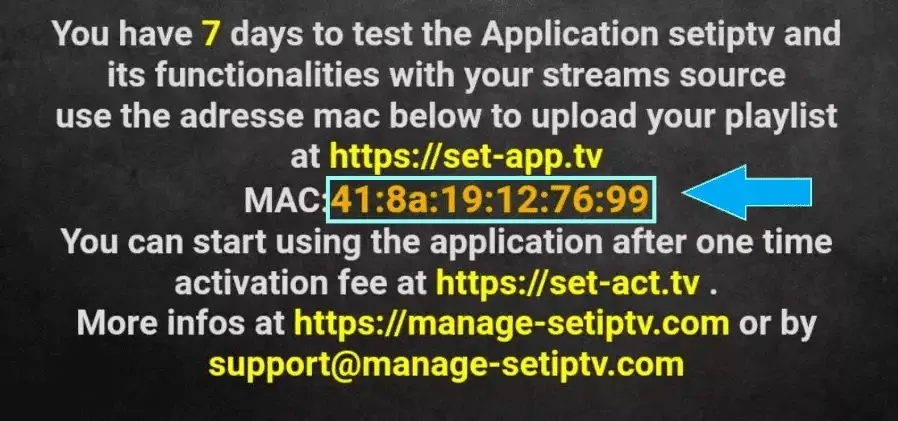
Step 3: Send us the MAC address via WhatsApp, Email, or Live Chat.
Step 4: After a few minutes, restart your TV and open the app. You're done!
Step 1: From the Fire TV home screen, hover over Find and click Search.
Step 2: Search for and select Downloader, then click Download and Open.
Step 3: Go to Settings → My Fire TV → Developer Options → Install Unknown Apps and enable Downloader.
Step 4: Launch Downloader and allow access. Type the following URL and click Go:
https://www.iptvsmarters.com/smarters.apk
Step 5: Wait for the file to download, then click Install and Done.
Step 6: Open IPTV Smarters, select Login with Xtream Codes API, and enter your subscription details (Username, Password, Portal URL) that we provide.
Step 1: Download IPTV Smarters:
https://www.iptvsmarters.com/download?download=windows
Step 2: Choose Login With Xtream Codes.
Step 3: Enter your Username, Password and Portal URL that we provide.
Step 1: Download IPTV Smarters:
https://www.iptvsmarters.com/download?download=mac
Step 2: Choose Login With Xtream Codes.
Step 3: Enter your Username, Password and Portal URL that we provide.
Step 1: When the box loads, click Settings and press the SETUP/SET button on your remote.
Step 2: Click System Settings → Servers → Portals.
Step 3: In the Portal 1 Name field enter a name. In Portal 1 URL enter the portal URL we provide.
Step 4: To activate, send us the MAC address from the label on the back of your box. We'll activate it remotely and send you the portal URL.
Step 5: Click OK to save, then press EXIT on your remote.
Step 6: Reboot your box and choose OK to apply changes.
Using KODI Krypton 17:
- Launch the Kodi app.
- In the left menu, click TV.
- Click Add-on browser.
- Click PVR IPTV Simple Client.
- Click Configure.
- Select General.
- Enter the IPTV subscription URL we provide.
- Wait for the channels to load.
Ready to Start Watching?
Get instant access to 50,000+ live channels and 300,000+ movies & series.
Plans📱 All IPTV Apps & Player Guides
📺 All IPTV Device Setup Guides
Frequently Asked Questions
Subscribe to Mojo 4K and receive your M3U URL and Xtream Codes credentials by WhatsApp in 60 seconds. Install a free IPTV player app (TiviMate for Firestick, IPTV Smarters Pro for Android/iOS, Smart IPTV for Samsung/LG TV), enter your credentials, and all 50,000+ channels load automatically.
TiviMate is the best IPTV app for Amazon Firestick and Android TV boxes. IPTV Smarters Pro works on Android, iOS, Windows and Mac. GSE Smart IPTV is the top choice for iPhone and Apple TV. Smart IPTV or SS IPTV work natively on Samsung and LG Smart TVs.
Mojo 4K activates in under 60 seconds. Once payment is confirmed, your Xtream Codes credentials and M3U URL are automatically sent to your WhatsApp or email. No manual processing — setup typically takes under 5 minutes total.
Yes — Mojo 4K IPTV works on Amazon Firestick, Samsung Smart TV, LG Smart TV, Android TV boxes, iPhone, iPad, Apple TV, Windows PC, Mac, Xiaomi Mi Box, Nvidia Shield, and virtually any device with an internet connection and a compatible player app.
You need: (1) An IPTV subscription from Mojo 4K (from $9/month), (2) A device with internet access (Firestick, Smart TV, phone, PC, etc.), (3) A free IPTV player app (TiviMate, IPTV Smarters Pro, etc.), and (4) A stable internet connection of at least 10 Mbps for HD or 25 Mbps for 4K.